
Jadi biasanya ketika kita ingin masuk ke halaman admin, pasti kita di suguhkan atau masuk dalam halaman login, dimana pasti terdapat username dan password yang sudah terdaftar pada admin, atau bisa kita contohkan selain admin yaitu ke halaman sosmed teman, pasti teman-teman sebelum masuk ke halaman profile teman-teman harus login terlebih dahulu bukan, ya seperti itu tapi disini kita akan sedikit memodifikasi ketika kita menekan tombol login terdapat jendela login, istilahnya jadi membuat sedikit lebih cantik lagi saat login, oke jangan kemana-mana sesaat lagi kita akan membahas membuat popup sederhana saat hendak login, simak terus ya teman-teman.
Dengan sentuhan CSS dan sedikit javascript kita bisa membuat popup sederhana saat hendak login, hal yang harus teman-teman persiapkan adalah:
- teman-teman harus sudah membuat database admin, karena disini saya akan mencontohkan masuk ke halaman admin.
- harus sudah mempunyai confi.php yaitu isinya tentang mengkoneksikan php ke database kita, saya harap teman-teman sudah bisa ya.
- teman-teman saya harap sudah bisa membuat form login sebelumnya, karena disini kita langsung akan membahas efek membuat popup sederhana saat hendak login secara langsung.
- disini saya mempunyai 3 file php, yaitu index, config, (sebenarnya file config kita bisa isi langsung di index tapi supaya rapi saya sudah terbiasa di pisahkan, selanjutnya halaman adminnya, seterha isi file halaman admin itu apa, yang jelas supaya kita tau, bahwa kita sudah masuk ke halaman admin.
jadi teman-teman persiapakan itu semua ya, oke langsung saya caranya sebagai berikut ini:
<-e-?php
ob_start();
session_start();
if(isset($_SESSION['admin_username'])) header("location:index.php");
include "config.php";

if(isset($_POST["submit_login"])){
    $username=$_POST["username"];
    $password=md5($_POST["password"]);
    $sql_login = mysqli_query($conn, "SELECT * FROM admin WHERE username ='$username'
                                        AND password = '$password' ");
    if(mysqli_num_rows($sql_login)>0){
        $row_admin = mysqli_fetch_array($sql_login);
        $_SESSION ['admin_id'] = $row_admin["id"];
        $_SESSION ['admin_username'] = $row_admin["username"];
        header ("location:berhasil.php");
    } else {
        header("location:index.php?failed");
    }
}
?>
<!DOCTYPE html>
<html>
<-e-style>
/* Full-width input fields */
input[type=text], input[type=password] {
    width: 100%;
    padding: 12px 20px;
    margin: 8px 0;
    display: inline-block;
    border: 1px solid #ccc;
    box-sizing: border-box;
}

/* Set a style for all buttons */
button {
    background-color: #4CAF50;
    color: white;
    padding: 14px 20px;
    margin: 8px 0;
    border: none;
    cursor: pointer;
    width: 100%;
}

button:hover {
    opacity: 0.8;
}

/* Extra styles for the cancel button */
.cancelbtn {
    width: auto;
    padding: 10px 18px;
    background-color: #f44336;
}

/* Center the image and position the close button */
.imgcontainer {
    text-align: center;
    margin: 24px 0 12px 0;
    position: relative;
}

img.avatar {
    width: 40%;
    border-radius: 50%;
}

.container {
    padding: 16px;
}

span.psw {
    float: right;
    padding-top: 16px;
}

/* The Modal (background) */
.modal {
    display: none; /* Hidden by default */
    position: fixed; /* Stay in place */
    z-index: 1; /* Sit on top */
    left: 0;
    top: 0;
    width: 100%; /* Full width */
    height: 100%; /* Full height */
    overflow: auto; /* Enable scroll if needed */
    background-color: rgb(0,0,0); /* Fallback color */
    background-color: rgba(0,0,0,0.4); /* Black w/ opacity */
    padding-top: 60px;
}

/* Modal Content/Box */
.modal-content {
    background-color: #fefefe;
    margin: 5% auto 15% auto; /* 5% from the top, 15% from the bottom and centered */
    border: 1px solid #888;
    width: 80%; /* Could be more or less, depending on screen size */
}

/* The Close Button (x) */
.close {
    position: absolute;
    right: 25px;
    top: 0;
    color: #000;
    font-size: 35px;
    font-weight: bold;
}

.close:hover,
.close:focus {
    color: red;
    cursor: pointer;
}

/* Add Zoom Animation */
.animate {
    -webkit-animation: animatezoom 0.6s;
    animation: animatezoom 0.6s
}

@-webkit-keyframes animatezoom {
    from {-webkit-transform: scale(0)}
    to {-webkit-transform: scale(1)}
}

@keyframes animatezoom {
    from {transform: scale(0)}
    to {transform: scale(1)}
}

/* Change styles for span and cancel button on extra small screens */
@media screen and (max-width: 300px) {
    span.psw {
       display: block;
       float: none;
    }
    .cancelbtn {
       width: 100%;
    }
}
</style>
<body>
<!-- <ul>
    <li onclick="document.getElementById('id01').style.display='block'" style="width:auto;">Login</li>
</ul> -->
<h2><strong>membuat popup sederhana saat hendak login</strong></h2>

<button onclick="document.getElementById('id01').style.display='block'" style="width:auto;">Login</button>
<?php if(isset($_GET["failed"])) {?>
                Username atau Password Anda Salah. Silakan hubungi Administrator.
            <?php } ?>
<div id="id01" class="modal">

  <form class="modal-content animate" method="post">
        <fieldset class="imgcontainer">
            <div class="form-group">
                <input class="form-control" placeholder="Username" name="username" type="text" autofocus="autofocus" />
            </div>
            <div class="form-group">
                 <input class="form-control" placeholder="Password" name="password" type="password" value="" />
            </div>
            <input type="submit" name="submit_login" value="Login" class="btn btn-lg btn-success btn-block"/>
        </fieldset>
    </form>
</div>

<-e-script>
// Get the modal
var modal = document.getElementById('id01');

// When the user clicks anywhere outside of the modal, close it
window.onclick = function(event) {
    if (event.target == modal) {
        modal.style.display = "none";
    }
}
</script>

</body>
</html>
Cukup panjang ya, padahal tampilan indexnya hanya terdapat Judul dan tombol login: oke langsung saya kita lihat halaman indexnya terlebih dahulu:
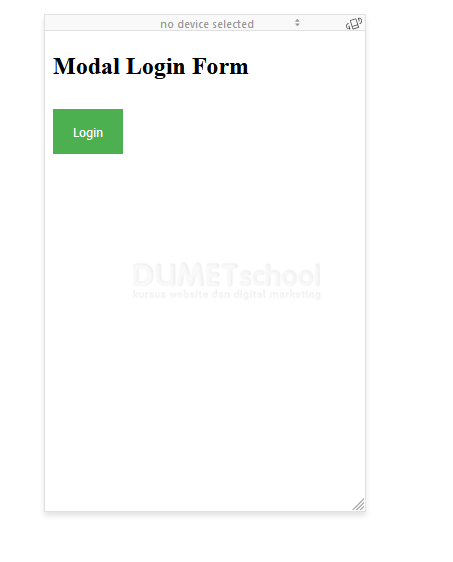
yang di atas ini adalah halaman indexnya ya teman-teman.
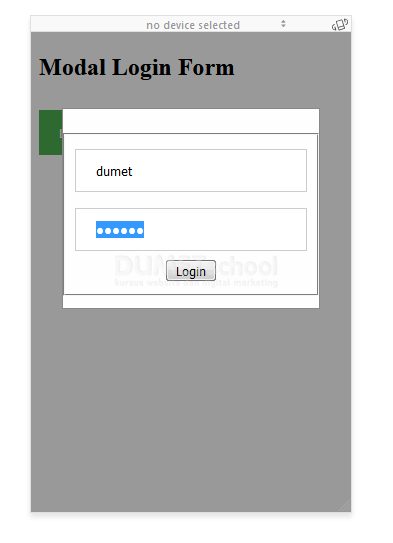
Nah ini dia kita akan memunculkan efek ini, jendela popup login, oke langsung saja kita tekan login supaya masuk ke halaman admin, tampilannya seperti ini:
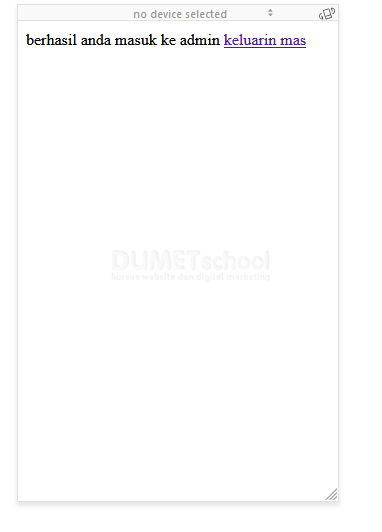
Sudah berhasil ya teman-teman, oke saya rasa pembahasn kita mengenai membuat popup sederhana saat hendak login, cukup ya teman-teman dan semoga bermafaat dan sampai jumpa pada artikel selanjutnnya terimakasih.