
halo teman teman kursuswebsite.org,berjumpa lagi di tutorial tutorial pemrogramman website dumet school, kalian mungkin pernah menemukan halaman 404 atau halaman error ketika kalian tidak bisa menemukan halaman tersebut, nah kali ini kita akan belajar bagaimana Membuat Desain 404 dengan HTML dan CSS, langsung saja yuk kita praktekan teman teman ..
kalian buka teks editor teman teman dan buat file html dengan nama index.html dan ketikan kode atau struktur HTML di bawah ini yah teman teman.
<!DOCTYPE html>
<html lang="en">
<head>
	<meta charset ="UTF-8">
	<title> 404 Design </title>
	<link href ="https://fonts.googleapis.com/css?family=Gamja+Flower|Gugi" rel="stylesheet">
	<link href ="style.css" rel ="stylesheet">
</head>
<body>
	<div class ="container">
		<h1> 404 </h1>
		<p> <span> Sorry!, </span> The page you requested was not found!.. </p>
		<form action="">
			<input type = "email" class ="email" placeholder="enter your email">
			<button> Submit </button>
		</form>
	</div>
</body>
</html>
setelah itu buat css nya beri nama file dengan nama style. css dan simpan jangan lupa yah teman teman.
*{
padding: 0; margin: 0;
}
body{
	background: #1e243c;
	padding: 20px;
}

.container{
	background: #d4294d;
	width: 1200px;
	margin: auto;
	padding: 20px;
	border: 10px solid #fff;
	position: relative;
}
h1{
	color:#fff;
	font-size: 300px;
	font-family: 'Gugi', cursive;
	text-align: center;
}
p{
	text-align: center;
	font-size: 50px;
	font-family: 'Gamja Flower', cursive;
	margin-bottom: 100px;
}
span{
	color: #fff;
}
.email{
	color: #fff;
	font-family: 'Gamja Flower', cursive;
	font-size: 20px;
	display: block;
	margin: auto;
	padding: 25px;
	width: 50%;
	border-radius: 50px;
	border:none;
	background: #000;
}
button{
	position: absolute;
	right: 250px;
	bottom:70px;
	padding: 25px;
	border: none;
	border-radius: 50px;
	color: #fff;
	background: #1e243c;
	cursor: pointer;
	font-size: 25px;
	font-family: 'Gamja Flower', cursive;
}
form{
	margin-bottom: 50px;
}

.email::placeholder{
	color: #ffffff;
	font-family: 'Gamja Flower', cursive;
	font-size: 30px;
}

@media screen and (max-width: 1300px) {
  .container {
    width: 100%; /* The width is 100%, when the viewport is 800px or smaller */
  }
}
teman teman bisa lihat hasilnya sebagai gambar berikut :
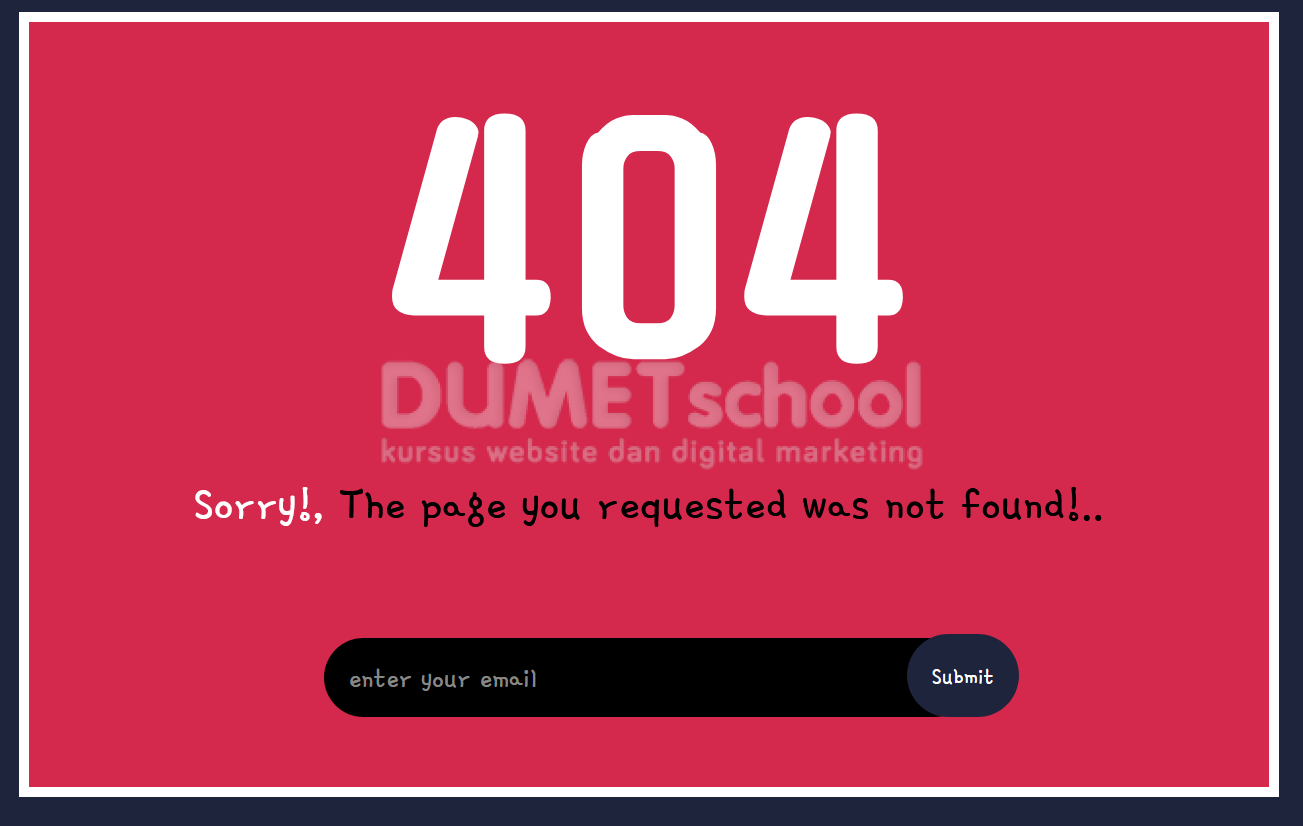
mudah sekali bukan, kalian bisa menempatkan halaman ini di aplikasi web eman teman yah.
sekian tutorial Membuat Desain 404 dengan HTML dan CSS, semoga bermanfaat yah teman teman.