
Cara Menghapus Jarak Antar Kolom pada Bulma
Apabila kita membuat suatu grid yang terdiri dari beberapa kolom pada bulma kita bisa melihat bahawa ada jarak antara kolom yang kita buat, jarak tersebut kita sebut gapless. Pasti temna-teman bertanya bagaimana cara menghilangkan jarak tersebut. Tenang saja pada tips dan trick kali ini saya akan memberi tips Cara Menghapus Jarak Antar Kolom pada Bulma.
Setiap kolom pada bulma memiliki padding masing-masing untuk memberikan jarak antar kolom satu denga kolom yang lainnya. Langsung saja saya akan memberikan langkah-langkah Cara Menghapus Jarak Antar Kolom pada Bulma:
– Pertama, anda download file bulmanya di situs bulma itu sendiri dan tempatkan pada folder project yang teman-teman buat.
– Kedua, anda ketikan kode html di bawah ini:
<!DOCTYPE html>
<html>
<head>
	<title>Gapless Bulma Framework</title>
	<!--link ke css bulma-->
	<link rel="stylesheet" href="bulma-0.4.0/css/bulma.css">
	<!--link ke font-awesome-->
	<link rel="stylesheet" href="https://maxcdn.bootstrapcdn.com/font-awesome/4.7.0/css/font-awesome.min.css">
</head>
<body>

	<br>

	<h4>Kolom yang masih ada jarak</h4>
	<br>
	<div class="columns">
		<div class="column is-4">
			<p class="notification is-warning">Lorem Ipsum is simply dummy text of the printing and typesetting industry. Lorem Ipsum has been the industry's standard dummy text ever since the 1500s</p>
		</div>

		<div class="column is-half">
			<p class="notification is-info">Lorem Ipsum is simply dummy text of the printing and typesetting industry. Lorem Ipsum has been the industry's standard dummy text ever since the 1500s</p>
		</div>

		<div class="column">
			<p class="notification is-danger">Lorem Ipsum is simply dummy text of the printing and typesetting industry. Lorem Ipsum has been the industry's standard dummy text ever since the 1500s</p>
		</div>

	</div>

	<h4>Kolom yang sudah di hapus jaraknya</h4>
	<br>
	<div class="columns is-gapless">
		<div class="column is-4">
			<p class="notification is-warning">Lorem Ipsum is simply dummy text of the printing and typesetting industry. Lorem Ipsum has been the industry's standard dummy text ever since the 1500s</p>
		</div>

		<div class="column is-half">
			<p class="notification is-info">Lorem Ipsum is simply dummy text of the printing and typesetting industry. Lorem Ipsum has been the industry's standard dummy text ever since the 1500s</p>
		</div>

		<div class="column">
			<p class="notification is-danger">Lorem Ipsum is simply dummy text of the printing and typesetting industry. Lorem Ipsum has been the industry's standard dummy text ever since the 1500s</p>
		</div>

	</div>

</body>
</html>
Setelah selesai coba teman-teman buka di browser teman-teman maka tampilannya akan menjadi seperti berikut:
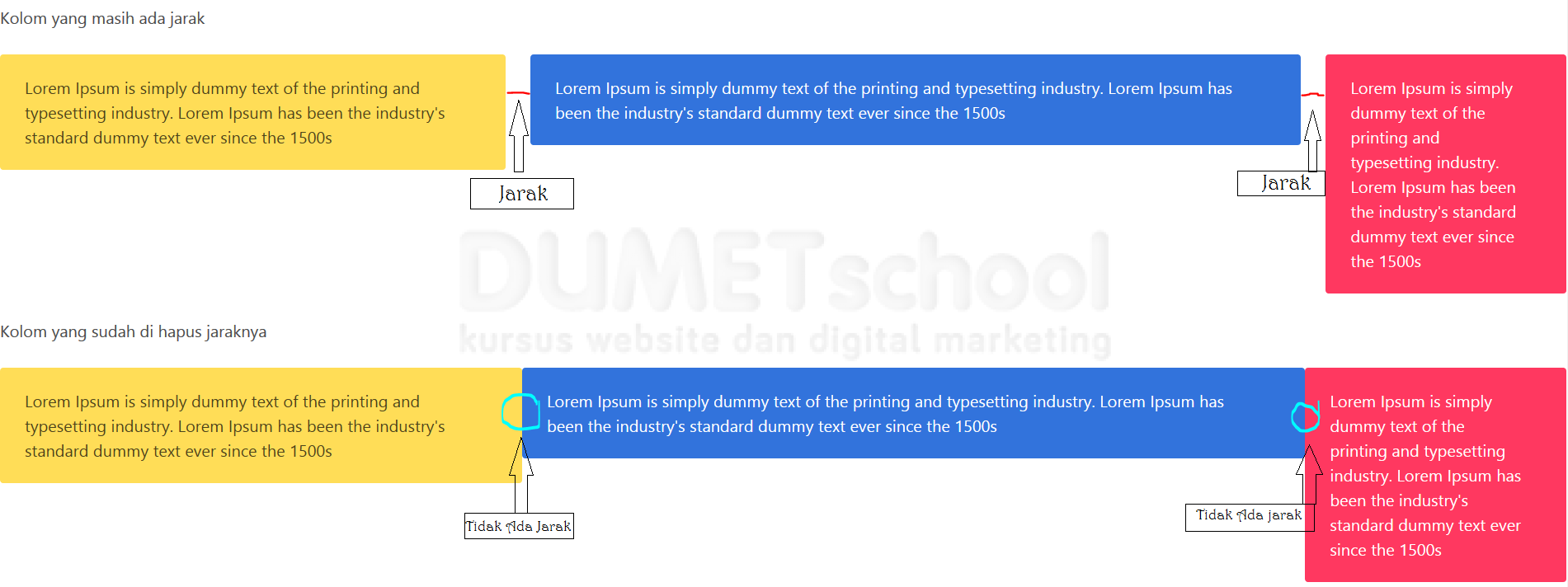
Pada gambar diatas teman-teman bisa melihat perbedaan antara kolom yang berum kita beri class .is-gapless dan yang sudah di berikan. Kesimpulannya class .is-gapless berfungsi unutk menghapus jarak atau padding dari kolom tersebut.
Dengan bulma kita dapat dengan mudah memodifikasi kolom dengan memberikan class yang sudah di sediakan oleh bulma. Bagaimana teman-teman cukup mudahkan menghapus jarak antar kolom pada bulma.
Sekian tips dan trick tentang Cara Menghapus Jarak Antar Kolom pada Bulma. Semoga bermanfaat.