
Secara umumnya setiap kolom atau class yang ada pada framework css mempunyai property dan value masing-masing seperti adanya padding dan margin di setiap class yang kita berikan pada elemn html. Pada tips dan trik kali ini saya akan membagikan Cara Menghilangkan Padding dan Margin di Bulma
Di bulma framework ada salah satu class helper yang memudahkan kita untuk menghilangkan padding dan margin bawaan pada class yang ada di bulma. Saya akan mengambil contoh menghilangkan padding pada class box dan margin pada class tittle, Langsung saja saya akan memberikan langkah-langkah Cara Menghilangkan Padding dan Margin di Bulma:
– Pertama, anda download file bulmanya di situs bulma itu sendiri dan tempatkan pada folder project yang teman-teman buat.
– Kedua, anda ketikan kode html di bawah ini:
<!DOCTYPE html>
<html>
<head>
	<title>Bulma Helper</title>
	<!--link ke css bulma-->
	<link rel="stylesheet" href="bulma-0.4.0/css/bulma.css">
	<!--link ke font-awesome-->
	<link rel="stylesheet" href="https://maxcdn.bootstrapcdn.com/font-awesome/4.7.0/css/font-awesome.min.css">
</head>
<body>

<br>

<div class="column">
<h1 class="title is-1 has-text-centered">Menghilangkan Padding dan Margin</h1>
  <div class="columns">

    <div class="column">
      <div class="box notification is-success">
        <h2 class="title is-4"><b>Paddingless</b></h2>
        <p class="subtitle">Lorem Ipsum is simply dummy text of the printing and typesetting industry. Lorem Ipsum has been the industry's standard dummy text ever since the 1500s, when an unknown printer took a galley of type and scrambled it to make a type specimen book. It has survived not only five centuries, but also the leap into electronic typesetting, remaining essentially unchanged. It was popularised in the 1960s with the release of Letraset sheets containing Lorem Ipsum passages, and more recently with desktop publishing software like Aldus PageMaker including versions of Lorem Ipsum.</p>
      </div>
    </div>

    <div class="column">
      <div class="box notification is-info">
        <h2 class="title is-4"><b>Marginless</b></h2>
        <p class="subtitle">Lorem Ipsum is simply dummy text of the printing and typesetting industry. Lorem Ipsum has been the industry's standard dummy text ever since the 1500s, when an unknown printer took a galley of type and scrambled it to make a type specimen book. It has survived not only five centuries, but also the leap into electronic typesetting, remaining essentially unchanged. It was popularised in the 1960s with the release of Letraset sheets containing Lorem Ipsum passages, and more recently with desktop publishing software like Aldus PageMaker including versions of Lorem Ipsum.</p>
      </div>
    </div>

  </div>
</div>
<br>
</body>
</html>
Coba teman-teman buka di browser teman-teman maka tampilannya akan menjadi seperti berikut:
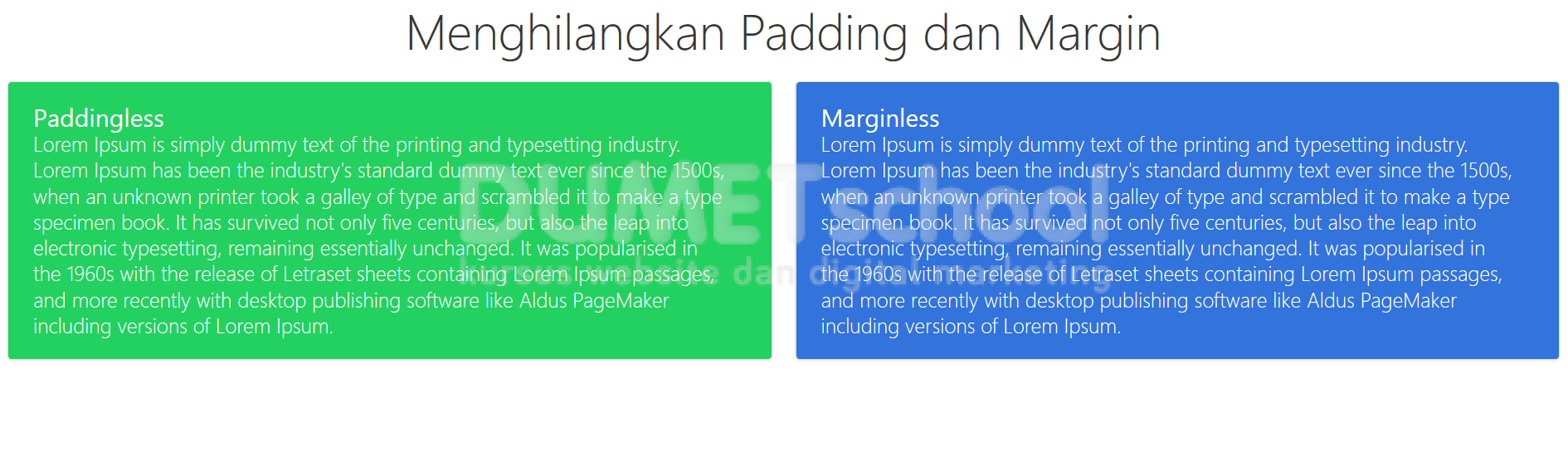
– Kita akan mencoba menghilangkan padding pada class box dan margin pada class tittle, sekarang coba teman-teman tambahkan class is-paddingless pada class box dan is-marginless pada class tittle :
<div class="column">
      <div class="box notification is-success is-paddingless"><!--paddingless-->
        <h2 class="title is-4"><b>Paddingless</b></h2>
        <p class="subtitle">Lorem Ipsum is simply dummy text of the printing and typesetting industry. Lorem Ipsum has been the industry's standard dummy text ever since the 1500s, when an unknown printer took a galley of type and scrambled it to make a type specimen book. It has survived not only five centuries, but also the leap into electronic typesetting, remaining essentially unchanged. It was popularised in the 1960s with the release of Letraset sheets containing Lorem Ipsum passages, and more recently with desktop publishing software like Aldus PageMaker including versions of Lorem Ipsum.</p>
      </div>
    </div>

    <div class="column">
      <div class="box notification is-info">
        <h2 class="title is-4 is-marginless"><b>Marginless</b></h2><!--marginless-->
        <p class="subtitle">Lorem Ipsum is simply dummy text of the printing and typesetting industry. Lorem Ipsum has been the industry's standard dummy text ever since the 1500s, when an unknown printer took a galley of type and scrambled it to make a type specimen book. It has survived not only five centuries, but also the leap into electronic typesetting, remaining essentially unchanged. It was popularised in the 1960s with the release of Letraset sheets containing Lorem Ipsum passages, and more recently with desktop publishing software like Aldus PageMaker including versions of Lorem Ipsum.</p>
      </div>
    </div>
Sekarang refresh browser teman-teman maka efek class yang tadi kita berikan akan terlihat seperti gamabar di bawah ini:
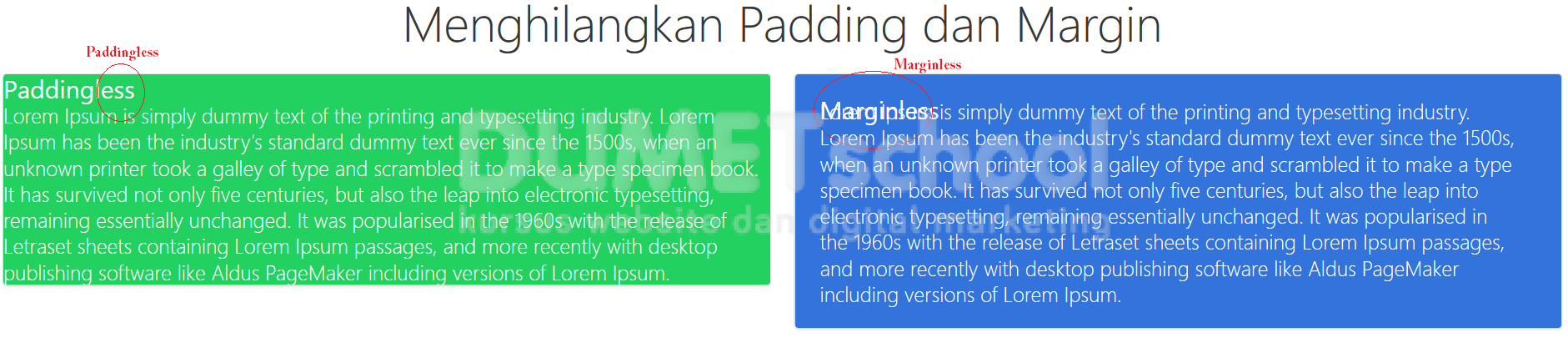
Dengan bulma kita dapat dengan mudah menghilangkan jarak dengan memberikan helper class yang sudah di sediakan oleh bulma. Bagaimana teman-teman cukup mudahkan Cara Menghilangkan Padding dan Margin di Bulma.
Sekian tips dan trick tentang Cara Menghilangkan Padding dan Margin di Bulma.