
Kemarin kita sudah belajar cara mengatur width dengan bootstrap sepertinya kita kurang lengkap jika tidak membahas cara mengatur height dengan mudah menggunakan bootstrap, memang width dan height sudah tidak bisa dipisahkan kecuali dengan spasi, oke bagaimana cara membuatnya simak terus ya teman-teman.
Cara mengatur height dengan mudah menggunakan bootstrap, Hamir sama seperti kita mengatur width, ya benar jika kita menggunakan bootstrap lagi, pasti kita akan bermain class yang di sediakan oleh bootstrap yang sudah ada efek untuk mengatur tinggi, oke langsung saja teman-teman perhatikan strukutur HTML berikut ini:
<!DOCTYPE html>
<html lang="en">
  <head>
    <!-- Required meta tags -->
    <meta charset="utf-8">
    <meta name="viewport" content="width=device-width, initial-scale=1, shrink-to-fit=no">
    <title>Cara Mengatur Height dengan Mudah Menggunakan Bootstrap</title>
    <!-- Bootstrap CSS -->
    <link rel="stylesheet" href="https://maxcdn.bootstrapcdn.com/bootstrap/4.0.0-beta/css/bootstrap.min.css" integrity="sha384-/Y6pD6FV/Vv2HJnA6t+vslU6fwYXjCFtcEpHbNJ0lyAFsXTsjBbfaDjzALeQsN6M" crossorigin="anonymous">

  </head>
  <body>
  <div class="container">
    <div class="row">
      <div class="col-md-12">
        <h1>Cara Mengatur Height dengan Mudah Menggunakan Bootstrap</h1>
        <div class="row bg-success">
        <div class="col-md-6">
          <p>Lorem Ipsum is simply dummy text of the printing and typesetting industry. Lorem Ipsum has been the industry's <span class="d-block bg-warning"> standard dummy text ever since the 1500s, when an unknown printer took a galley of type and scrambled it to make a type specimen book</span> . It has survived not only five centuries, but also the leap into electronic typesetting, remaining essentially unchanged. It was popularised in the 1960s with the release of Letraset sheets containing Lorem Ipsum passages, and more recently with desktop publishing software like Aldus PageMaker including versions of Lorem Ipsum.</p>
        </div>
          <div class="col-md-6">
          <p>Contrary to popular belief, Lorem Ipsum is not simply random text. It has roots in a piece of classical Latin literature from 45 BC, making it over 2000 years old. Richard McClintock, a Latin professor at Hampden-Sydney College in Virginia, looked up one of the more obscure Latin words, consectetur, from a Lorem Ipsum passage, and going through the cites of the word in classical literature, discovered the undoubtable source. Lorem Ipsum comes from sections 1.10.32 and 1.10.33 of "de Finibus Bonorum et Malorum" (The Extremes of Good and Evil) by Cicero, written in 45 BC. This book is a treatise on the theory of ethics, very popular during the Renaissance.</p>
        </div>
        </div>
      </div>
    </div>
  </div>
  <div class="container">
    <div style="height: 100px; background-color: rgba(255,0,0,0.1);">
      <div class="h-25 d-inline-block" style="width: 120px; background-color: rgba(0,0,255,.1)">Height 25%</div>
      <div class="h-50 d-inline-block" style="width: 120px; background-color: rgba(0,0,255,.1)">Height 50%</div>
      <div class="h-75 d-inline-block" style="width: 120px; background-color: rgba(0,0,255,.1)">Height 75%</div>
      <div class="h-100 d-inline-block" style="width: 120px; background-color: rgba(0,0,255,.1)">Height 100%</div>
    </div>
  </div>
    <!-- Optional JavaScript -->
    <!-- jQuery first, then Popper.js, then Bootstrap JS -->
    <-e-script src="https://code.jquery.com/jquery-3.2.1.slim.min.js" integrity="sha384-KJ3o2DKtIkvYIK3UENzmM7KCkRr/rE9/Qpg6aAZGJwFDMVNA/GpGFF93hXpG5KkN" crossorigin="anonymous"><-e-/script>
    <-e-script src="https://cdnjs.cloudflare.com/ajax/libs/popper.js/1.11.0/umd/popper.min.js" integrity="sha384-b/U6ypiBEHpOf/4+1nzFpr53nxSS+GLCkfwBdFNTxtclqqenISfwAzpKaMNFNmj4" crossorigin="anonymous"><-e-/script>
    <-e-script src="https://maxcdn.bootstrapcdn.com/bootstrap/4.0.0-beta/js/bootstrap.min.js" integrity="sha384-h0AbiXch4ZDo7tp9hKZ4TsHbi047NrKGLO3SEJAg45jXxnGIfYzk4Si90RDIqNm1" crossorigin="anonymous"><-e-/script>
  </body>
</html>
Seperti biasa teman-teman silahkan hilangkan tanda -e- , dan teman-teman perhatikan juga class h-25, dimana jika kita memberikan class h-25, berarti kita memberikan height sebesar 25%, oke lalu bagaimana hasilnya:
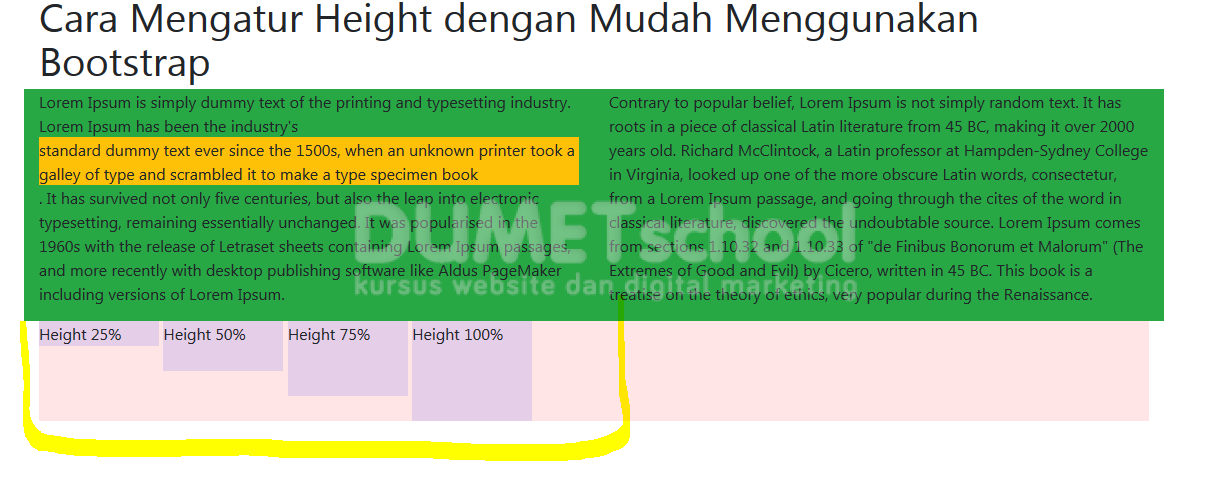
Seperti inilah hasilnya yang saya beri tanda kuning, bagaimana menarik ya, oke sekian dulu artikel kali ini tentang Cara mengatur height dengan mudah menggunakan bootstrap, semoga bermanfaat dan sampai jumpa pada artikel selanjutnya terimakasih.