
halo teman teman, Selamat datang di tutorial website Dumet School, membahas tentang desain memang tidak ada henti henti nya, mungkin kita pernah melihat ada sebuah form di mana tampilan nya sangat sederhana dan tidak sama sekali menarik, sering sekali bukan kita melihat nya, nah kali ini saya akan menshare Cara Membuat Desain Flat Login Form dengan HTML dan CSS, yuk langsung saja kita praktekan teman teman.
seperti biasa, teman teman buka text editor kesayangan teman teman, dan buat file index. html dan jangan lupa di save, oh iya ketikkan kode berikut untuk html nya yah teman teman
<!DOCTYPE html>
<html lang ="en">
<head>
  <meta charset ="UTF-8">
  <title> Form Flat Design HTML & CSS </title>
  <link rel ="stylesheet" href ="style.css">
</head>
<body>
    <!-- Form Mixin -->
    <!-- Input Mixin -->
    <!-- Button Mixin -->
    <!-- Pen Title -->
    <div class ="pen-title">
      <h1>Flat Login Form</h1>
    </div>
    <!-- Form Module-->
    <div class ="module form-module">
      <!-- <div class="toggle"><i class="fa fa-times fa-pencil"></i>
        <div class="tooltip">Click Me</div>
      </div> -->
      <div class ="form">
        <h2>Login to your account</h2>
        <form>
          <input type ="text" placeholder ="Username"/>
          <input type ="password" placeholder ="Password"/>
          <button>Login</button>
        </form>
      </div>
      <div class="form">
        <h2>Create an account</h2>
        <form>
          <input type ="text" placeholder ="Username"/>
          <input type ="password" placeholder ="Password"/>
          <input type ="email" placeholder ="Email Address"/>
          <input type ="tel" placeholder ="Phone Number"/>
          <button> Register </button>
        </form>
      </div>
      <div class ="cta"> <a href="#"> Forgot your password? </a></div>
    </div>
</body>
</html>
tampilan nya seperti berikut.
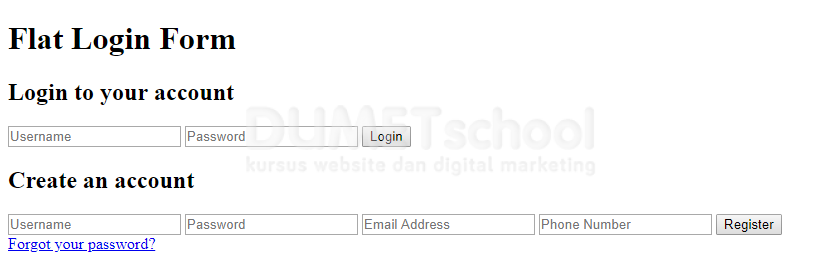
masih sangat sederhana, oke mari kita hias dengan css, teman teman ke text editor lagi dan buat file style.css dan ketikan kode berikut dan jangan lupa di simpan yah teman teman.
body {
  background: #e9e9e9;
  color: #666666;
  font-family: "RobotoDraft", "Roboto", sans-serif;
  font-size: 14px;
  -webkit-font-smoothing: antialiased;
  -moz-osx-font-smoothing: grayscale;
}

/* Pen Title */
.pen-title {
  padding: 6px 0;
  text-align: center;
  letter-spacing: 2px;
}
.pen-title h1 {
  margin: 0 0 20px;
  font-size: 48px;
  font-weight: 300;
}
.pen-title span {
  font-size: 12px;
}
.pen-title span .fa {
  color: #33b5e5;
}
.pen-title span a {
  color: #33b5e5;
  font-weight: 600;
  text-decoration: none;
}

/* Form Module */
.form-module {
  position: relative;
  background: #ffffff;
  max-width: 400px;
  width: 100%;
  /* border-top: 5px solid #33b5e5; */
  border-top: 5px solid #c3184f;
  box-shadow: 0 0 3px rgba(0, 0, 0, 0.1);
  margin: 0 auto;
}
.form-module .toggle {
  cursor: pointer;
  position: absolute;
  top: -0;
  right: -0;
  background: #33b5e5;
  width: 30px;
  height: 30px;
  margin: -5px 0 0;
  color: #ffffff;
  font-size: 12px;
  line-height: 30px;
  text-align: center;
}
.form-module .toggle .tooltip {
  position: absolute;
  top: 5px;
  right: -65px;
  display: block;
  background: rgba(0, 0, 0, 0.6);
  width: auto;
  padding: 5px;
  font-size: 10px;
  line-height: 1;
  text-transform: uppercase;
}
.form-module .toggle .tooltip:before {
  content: "";
  position: absolute;
  top: 5px;
  left: -5px;
  display: block;
  border-top: 5px solid transparent;
  border-bottom: 5px solid transparent;
  border-right: 5px solid rgba(0, 0, 0, 0.6);
}
.form-module .form {
  display: none;
  padding: 40px;
}
.form-module .form:nth-child(2) {
  display: block;
}
.form-module h2 {
  margin: 0 0 20px;
  /* color: #33b5e5; */
  color:#c3184f;
  font-size: 18px;
  font-weight: 400;
  line-height: 1;
}
.form-module input {
  outline: none;
  display: block;
  width: 100%;
  border: 1px solid #d9d9d9;
  margin: 0 0 20px;
  padding: 10px 15px;
  box-sizing: border-box;
  font-wieght: 400;
  transition: 0.3s ease;
}
.form-module input:focus {
  /* border: 1px solid #33b5e5; */
  border: 1px solid #c3184f;
  color: #333333;
}
.form-module button {
  cursor: pointer;
  /* background: #33b5e5; */
  background: #c3184f;
  width: 100%;
  border: 0;
  padding: 10px 15px;
  color: #ffffff;
  transition: 0.3s ease;
}
.form-module button:hover {
  /* background: #178ab4; */
  background: #c3184f;
}
.form-module .cta {
  background: #f2f2f2;
  width: 100%;
  padding: 15px 40px;
  box-sizing: border-box;
  color: #666666;
  font-size: 12px;
  text-align: center;
}
.form-module .cta a {
  color: #333333;
  text-decoration: none;
}
seperti ini tampilan nya ketika sudah di beri CSS.

bagus bukan, nah gampang kan membuat nya, sekian tutorial Membuat Desain Flat Login Form dengan HTML dan CSS, semoga bermanfaat…